What it’s for
It keeps count of the km and hours of every bike and every part and tells you when it’s time to check. The app counts, it doesn’t measure wear: the alert says “check”, with the criterion to decide.
How it works
- Automatic km: each ride goes to the bike, wheelset and shoes in use at the start time. You change them with one tap; in PostWO you fix a single ride. Rides from intervals.icu carry the bike used: you match it once to one of yours.
- Indoors the trainer type counts: “Direct drive” (tyres don’t move, the cassette is the trainer’s), “Wheel-on” (rear tyre only, which by default wears twice as fast) and “Rollers” (like the road, brakes excluded). Pads, discs and cleats count road km only.
- Alerts at 90% of the interval. First the starting values apply (for example the chain: 4000 km with oil, 5000 with drip wax, 8000 with immersion wax, half off-road), then the pace you state and, after two logged replacements, your real pace. Chain: replace it at 0.5% on the checker with 11-13 speed, at 0.75% with 10 or fewer.
- Suspension by hours, from the makers’ manuals: RockShox 50 and 200 hours, Fox 125 hours or one year, Fox Transfer 125 and 300 hours; for another brand, enter the manual’s hours.
- When you log a service, that part’s counter restarts from zero and the alert turns off. Alerts can also be turned off by hand; off, the km are still counted.
- Bike weight: it goes into the CdA test and into climbing times (race course, race duration, suggested routes). Empty, the [AREA199] 9 kg apply.
What you see in the app
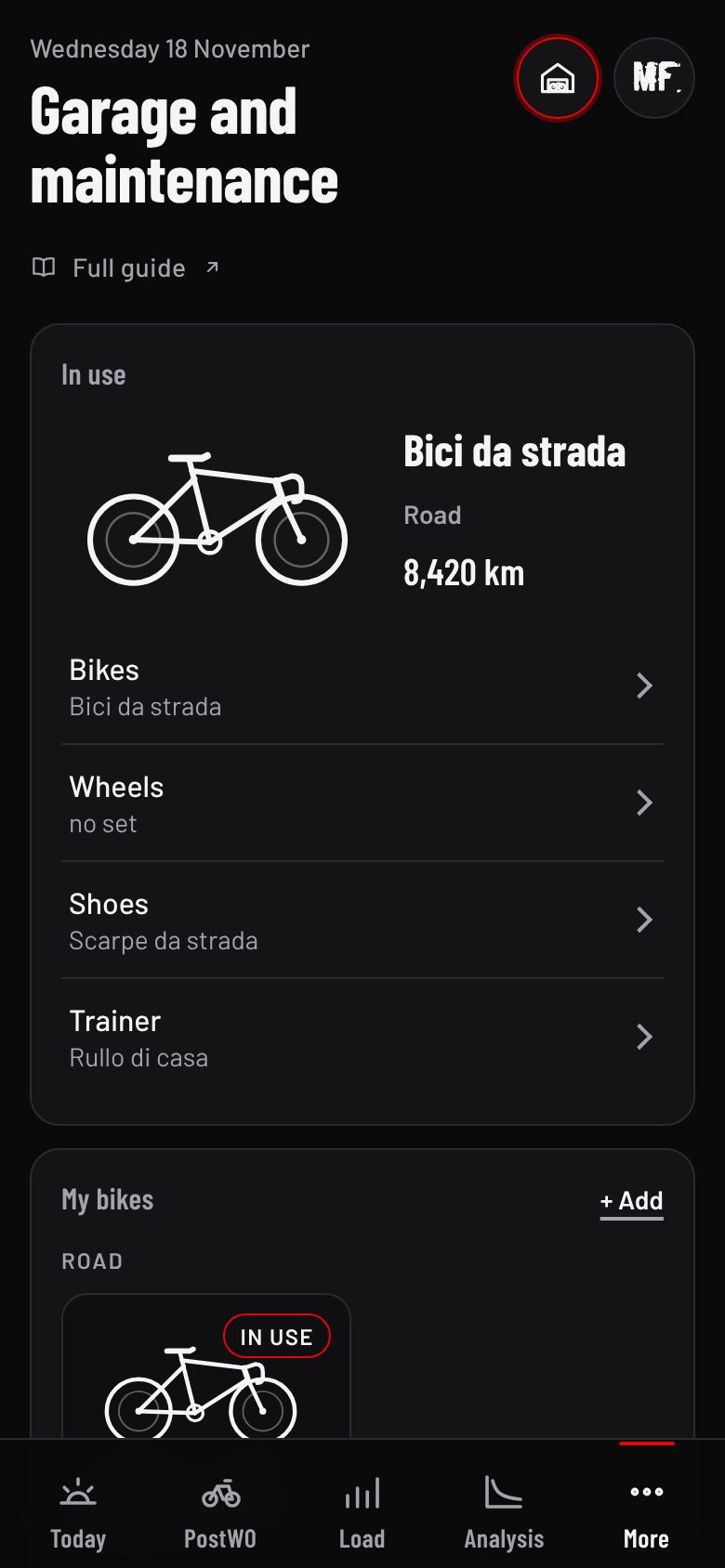
It opens from the icon next to the profile or from More → “Garage and maintenance”. At the top “In use”; then “My bikes” by category (Road, TT / Triathlon, Gravel, MTB, E-bike, City), wheelsets, shoes and trainers with “+ Add”. In each item’s card, “Components” with km done out of km planned, “Log service” and “Services”; at the bottom “History and spending”, by month and by period. A part to check turns yellow, and so do the bike and the Garage icon.
How to do it
- Tap “+ Add” and create your first bike: name, category and, if you like, photo and weight.
- Add wheelsets, shoes and trainer if you have them, and mark what’s in use.
- When you replace a part, open the component and tap “Log service”, with the date and, if you like, the cost.
Video
▶ Video coming soon: Antonio Petruzzi explains this feature.Sources
The numbers are those of the “i” in the app; tapping them opens the entry in the Bibliography.
[48] Park Tool 2026 · [96] RockShox (SRAM) 2026 · [97] FOX Factory 2026 · [98] FOX Factory 2026 · [99] FOX Factory 2026 · [82] Martin JC et al. 1998